Showing posts with label Free Image Host. Show all posts

February 2, 2009

Free Image Host 7 - fileUPYOURS.Com Reviews

fileUPYOURS.Com Reviews at free-host-reviews.blogspot.com

Host URL: http://fileupyours.com/
Host Location: United States

Feature ReviewsHost ProvideRate (5)
registration requireyes3

max file size1 MB2
diskspace100MB3
bandwidth500MB/Month3
file deletedno expired5
account deleted25 day (inactive)2
project/groupyes5
passwordno0
delete own fileyes5
download statisticsno0
hotlinking allowedyes5
Average=33/11 = 3

---------

Step By Step

1) Registration require.

fileUPYOURS.Com Reviews-1 at free-host-reviews.blogspot.com

2) Login to your account, show your detail such as usage statistics. Create your folder. Upload files or images to your folder.

fileUPYOURS.Com Reviews-2 at free-host-reviews.blogspot.com

3) Show link of your file. Use this link for your web for download link.

fileUPYOURS.Com Reviews-3 at free-host-reviews.blogspot.com

4) See you file detail and easy manage by create link, delete or move to other folder.

fileUPYOURS.Com Reviews-4 at free-host-reviews.blogspot.com

5) You can also upload your image and get link for use in your web.

fileUPYOURS.Com Reviews-5 at free-host-reviews.blogspot.com

6) There have a photo gallery link of your image.
http://www.fileUPYOURS.com/gallery/username

fileUPYOURS.Com Reviews-6 at free-host-reviews.blogspot.com
----------

Overall Reviews Rate:

Comment:

- Bandwidth and diskspace is limited.
- Both for file and image storage but best for image only.

January 26, 2009

Free Image Host 6 - Photoserver.Us Reviews

Photoserver.us Reviews at free-host-reviews.blogspot.com

Host URL: http://www.photoserver.us/
Host Location: Germany


Feature ReviewsHost ProvideRate (5)
registration requireyes3
max file sizen/a3
mine typejpg, gif, png4
image lifen/a3
file upload/time1 or 33
diskspace555MB4
bandwidth1000MB/Month4
view statisticsyes5
slideshowsyes5
album/projectyes5
Average=40/10 = 4
----------

Step By Step

1) Free registration require for use.

Photoserver.us Reviews-1 at free-host-reviews.blogspot.com

2) Create folder for keep your image.

Photoserver.us Reviews-2 at free-host-reviews.blogspot.com

3) Upload your image by select option 1 or 3 image/time.

Photoserver.us Reviews-3 at free-host-reviews.blogspot.com

4) For use your image in your web or blog. Right click on image > copy image address: http://www.PhotoServer.us/is.php?i=167831&img=test-image-2.jp.jpg

Photoserver.us Reviews-4 at free-host-reviews.blogspot.com

5) Image sample.

Photoserver.us Reviews-5 at free-host-reviews.blogspot.com
----------

Test Your Image

I test by upload my image to this host. How do you show your image on your site (or blog like blogger).

You can show your image on this blog by modify code below:

==========
image-2.jp.jpg" target="_blank">
Imagexoom.com Reviews-Test Result at free-host-reviews.blogspot.comimage-2.jp.jpg" border="0" />

==========

Test Result

Photoserver.us Reviews-Test Result at free-host-reviews.blogspot.com

Extra Features Test Result

1. Sildeshows Example
2. Image Portfolios Example
3. Gallery Example
----------

Overall Reviews Rate:

Comment:

- More function such as slideshows, portfolios and gallery.

January 22, 2009

Free Image Host 5 - Imagexoom.Com Reviews

Imagexoom.com Reviews at free-host-reviews.blogspot.com

Host URL: http://www.imagexoom.com/
Host Location: United States


Feature ReviewsHost ProvideRate (5)
registration requireyes3
max file size1MB3
mine typejpg, etc.5
image lifen/a5
file upload/time13
diskspace50MB3
bandwidth500MB/Month2
view statisticsno0
slideshowsno0
album/projectno0
Average=25/10 = 2.5

----------

Step By Step

1) Free registration require for use.

Imagexoom.com Reviews-1 at free-host-reviews.blogspot.com


2) Upload your image 1 image/time.

Imagexoom.com-2 at free-host-reviews.blogspot.com

3) When finish, you can see link of your gallery but it's not link of your image.

Imagexoom.com Reviews-3 at free-host-reviews.blogspot.com

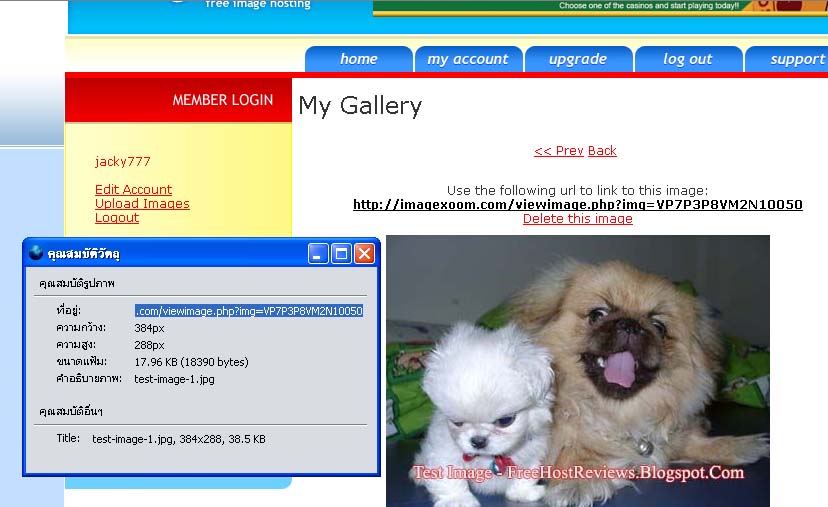
4) For use your image in your web or blog. Right click on image > copy image address: http://www.imagexoom.com/viewimage.php?img=VP7P3P8VM2N10050

Imagexoom.com Reviews-4 at free-host-reviews.blogspot.com
----------

Test Your Image

I test by upload my image to this host. How do you show your image on your site (or blog like blogger).

You can show your image on this blog by modify code below:

==========

Imagexoom.com Reviews-Test Result at free-host-reviews.blogspot.com

==========

Test Result

Imagexoom.com Reviews-Test Result at free-host-reviews.blogspot.com
----------

Overall Reviews Rate:

Comment:

- Very easy upload and use.
- Not show direct image address.
- Every click on this site. It's show pop-up ad (It's boring).

Free Image Host 4 - ImageHeap.Com Reviews

Imageheap.Com Reviews at free-host-reviews.blogspot.com

Host URL: http://www.imageheap.com/
Host Location: United States


Feature ReviewsHost ProvideRate (5)
registration requireyes3
max file size2MB3
mine typeAll5
image life-0
file upload/time3 4
diskspace60MB3
bandwidth150MB3
view statisticsyes4
slideshowsno0
album/projectyes4
Average=29/10 = 2.9

----------

Step By Step

1) First, you must register by select "Free Plan".

Imageheap.Com Reviews-1 at freehostreviews.blogspot.com


2) Create new account for free plan. You can get 60MB space and 150MB of monthly bandwidth.
Imageheap.com Reviews-2 at freehostreviews.blogspot.com


3) Log in to account. You can create folder for your image.

Imageheap.Com Reviews-3 at freehostreviews.blogspot.com


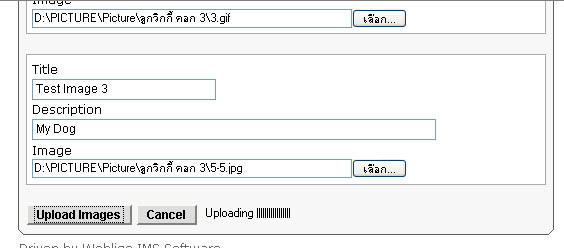
4) Uploading your image 3 images/time and there have uploading status.

Imageheap.Com Reviews-4 at freehostreviews.blogspot.com


5) Finish, you can see your image with code of your image.

Imageheap.Com Reviews-5 at freehostreviews.blogspot.com


6) This is image code.
- HTML Code for paste as your web site or blog like this.
- UBB Code for for use on webboard or forum.

Imageheap.Com Reviews-6 at freehostreviews.blogspot.com

7) This is your image preview. It's show views statistic.

Imageheap.Com Reviews-7 at freehostreviews.blogspot.com
----------

Test Your Image

I test by upload my image to this host. How do you show your image on your site (or blog like blogger).

You can show your image on this blog by modify code below:

==========

Imageheap.com Reviews-Test Result at free-host-reviews.blogspot.com

==========

----------

Overall Reviews Rate:

Like:

- File size is ok.
- Delete own image file.
- Image view statistics.

Dislike:

- Space and bandwidth is limited.

April 23, 2008

Free Image Host 3 - Filehost.To Reviews

Filehost.to Reviews at freehostreviews.blogspot.com

Host URL: http://filehost.to/
Host Location: Germany


Feature ReviewsHost ProvideRate (5)
registration requiren05
max file size5MB4
mine typegif, jpg, jpeg, png, bmp5
image life-0
file upload/time13
diskspaceunlimited5
bandwidthunlimited5
view statisticsno0
slideshowsno0
album/projectno0
Average=27/10 = 2.7

----------

Step By Step

1) Easy to upload on fisrt screen. No registration require.

Filehost.to Reviews-1 at freehostreviews.blogspot.com


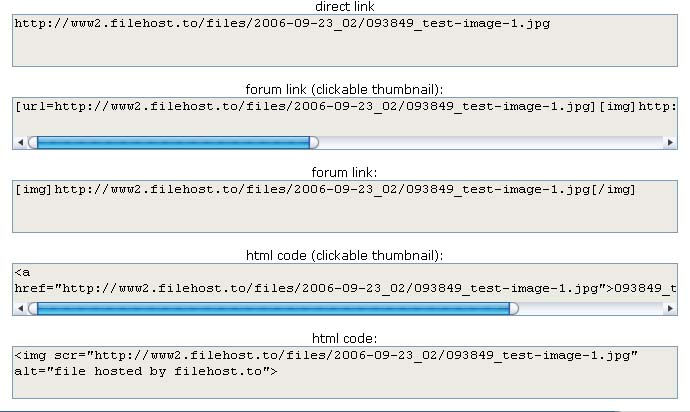
2) When finish, you can see link of your picture including:
- direct link
- forum link use in forum.
- html code use in web site or blog.

Filehost.to Reviews-2 at freehostreviews.blogspot.com
----------

Test Your Image

I test by upload my image to this host.
How do you show your image on your site (or blog like blogger).

You can show your image on this blog by modify code below:

==========

Filehost.to Reviews-Test Result at free-host-reviews.blogspot.com

==========

Test Result

Filehost.to Reviews-Test Result at freehostreviews.blogspot.com
----------

Overall Reviews Rate:

Comment:

- Very easy upload and use.
- Only bitmaps will be converted into png files!
- Hotlinking/direct linking is allowed.